It was a little past midnight when I picked up my phone and said, “Hey GRIOT, can you turn the light red in the recording studio?”
From the corner of my eye, I saw the light in my recording studio turn red.
Success!
Then a voice answered. “Done. Your recording studio light is now red.”
The voice was GRIOT’s, the voice I built for my agent. It wasn’t coming out of a workflow or a Telegram chat. It was coming from my phone, through the Home Assistant app.
Meanwhile, just days earlier, the box that made all this possible was sitting under a TV, plugged in, gathering dust.
The item in question is the Home Assistant Green. It’s a small box with a clear lid and a blue light that I set up, gave a password, but never really figured out how to use.
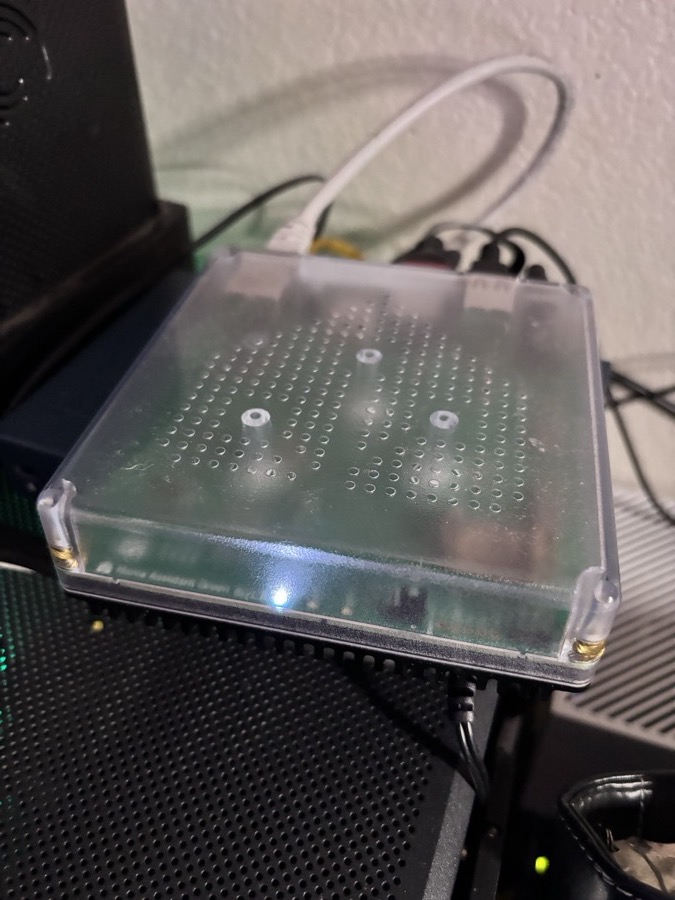
This past Sunday, at the suggestion of my colleague Daniel, I watched a video of a guy throwing his Alexa in the trash and building his own voice assistant that ran on his own hardware, in his own house. I knew I needed to implement that same solution.
But I didn’t just want a smarter light switch. I wanted the house to work with GRIOT, and with the other agents I was creating to help me with everyday tasks.
So my next step was to ask Claude to watch the video with me. Claude read the transcript, broke his build down into four levels, and told me which parts were worth emulating for my setup and which ones were not. That was especially helpful, because he and I have very different tech stacks.
Once that was done, we went looking for the assistant. It wasn’t on the network.
When I plugged it into the router, it showed up, but I couldn’t remember the password. The fix was to type a reset command on the box itself, but the keyboard wouldn’t register. So I rebooted it, plugged it into the TV, and tried again.
Nothing happened.
So we wiped it. We held the button down, plugged the power back in, waited for the yellow light, and let go.
Twenty minutes later, the assistant came back as a brand new house. No password. No history. Just a list of things it had found on its own: the TVs, the Apple TV, the printer, the PlayStation, and a color bulb in my recording studio. Things that had been in the house the whole time, each stuck in its own app, just waiting to be used.
Here’s the thing that matters, the part nobody sees. When I talk to my house now, five things happen.
First, my voice goes to the box in my office.
Next, Whisper, which runs on the assistant, turns it into text, so the recording never leaves my home.
Third, Claude reads the text and decides what I meant.
Fourth, Home Assistant tells the device what to do.
And finally, GRIOT’s voice says it back to me.
Each step carries one task in the process. And there’s one more piece sitting in the middle of all of that, which is a list.
Home Assistant lets me choose exactly which devices an AI is allowed to see, like the lights, the TVs, or the cameras’ motion sensors, because those are useful to me every day. However, things like arming and disarming the cameras are not on the list. Turning off motion detection, also not on the list. Locks, garage doors and windows are not on the list yet, but they might be if we deem them useful.
- Lights
- TVs
- Camera motion sensors
- Arming and disarming the cameras
- Turning off motion detection
- Locks, garage doors, windows
For Hermes, the agent that runs around the clock, we went a bit further. Hermes can see more of the house than Claude can, so we put a guard on it. Before Hermes changes anything, the guard checks the request. When asked to arm the cameras, Hermes replied: “Blocked by house policy.”
That’s not a setting I’d have thought to look for on my own, but Claude helped me flag it before I ran into it.
Before Sunday, I had a TV app, a Roku app, a camera app, a light app, a PlayStation app and a printer app. Those were six different companies, with six different logins, and basically six places where my family’s data goes.
And none of them talk to one another. Obviously, that isn’t by accident. Each company wants its app to be the place where I spend my time, because the more time I spend inside it, the more it learns about my house, and the harder it is to leave.
But Home Assistant flips that dynamic for me. The brain now sits in my office, and the devices answer to it. Any one of those companies can still see what its own device is doing, but none of them gets to be the center of my home any longer.
The thing that surprised me most was how much smarter my house already was than I realized. It didn’t need more gadgets. It just needed something to connect them all together.
In West African tradition, a griot is the keeper of a family’s story. Griots are the ones who remember who did what, who’s connected to whom, and what the family decided. They’re traditionally tied to a family and stay close to the people they serve.
That’s why I named my agent GRIOT.
It first started as an agent: a brain in n8n that could check my calendar, search my contacts, send emails and get things done.
Then it became an ally, when it moved onto my phone. I connected it with Siri so I could ask what was on my calendar and what information was in my databases, and it would answer me, including telling me when something needed my attention.
And now, GRIOT lives in my Home Assistant.
Later that night, I asked: “Ask GRIOT what’s on my schedule tomorrow.”
Claude recognized it instantly as a question for GRIOT and handed it over, which I was able to watch happen in n8n.
Seconds later, the house read me my schedule for the next day, including a warning that two things were overlapping at noon. That warning helped me save time by rescheduling with someone I needed to speak to.
So now Claude runs the house, GRIOT is the voice and the memory, and each one does the job it’s best at.
To be clear, it wasn’t smooth getting here. During my first test session, eighty percent of the requests worked. But when I asked for “deep ocean mode,” the house went silent for 96 seconds. And when I asked it to put Netflix on the kids’ TV, it said it couldn’t. Eventually, though, Claude went into the house’s own records, found both causes, and fixed them for me. So I know we can keep making progress.
My kids now have a light show. It’s called Ocean Descent, and it’s inspired by one of my favorite movies, The Abyss. Sunlight falls into a slow, deep blue, then darkness, and then a red glow emerges, which grows into orange, yellow and white. I watched it, deleted the last two steps myself, and saved it. That was the first thing I ever built in Home Assistant with my own hands.
My wife is getting a simple guide for talking to the house, and an option to get the kids’ screen time reports alongside me. And I’ve got a box of ESP32s and sensors that I’m about to build into devices that can help me manage specific parts of life in the house.
The lesson I keep coming back to is simple. The first thing I let an AI touch in my house was a light. Not a lock. Not the cameras.
A light, where a mistake costs nothing, and getting it right gives my kids an amazing light show.
Each of us is going to have AI brought into our homes, our families and our businesses at some point. The question isn’t whether it happens. It’s what we let it touch first, and what stays in our hands until we trust it.
For me, it started with that light in the studio.
GRIOT just moved in.