Twenty minutes into Wednesday’s class, I clicked a button on my desktop and said, “Hey Siri, what is on my schedule for Saturday?”
And for 30 seconds, nothing happened.
Anyone who has done a live demo knows that kind of quiet. It is nerve wracking. I kept talking to fill the space. I walked the room through what was going on behind the silence, partly to teach and partly because I needed something to do with my hands. Somebody said my desktop was very clean. I took the compliment.
And then, out of nowhere, Siri spoke. She told me three things I had coming up Saturday: an early-morning block to clean the HVAC and swap the filters, a recurring build session with a client, and a kid’s birthday party in the afternoon.
The voice was Siri’s. The answer came from GRIOT.
Siri doesn’t know much about me or my Saturday. She never has. She works for everybody, so she doesn’t know anything about any one of us in particular.
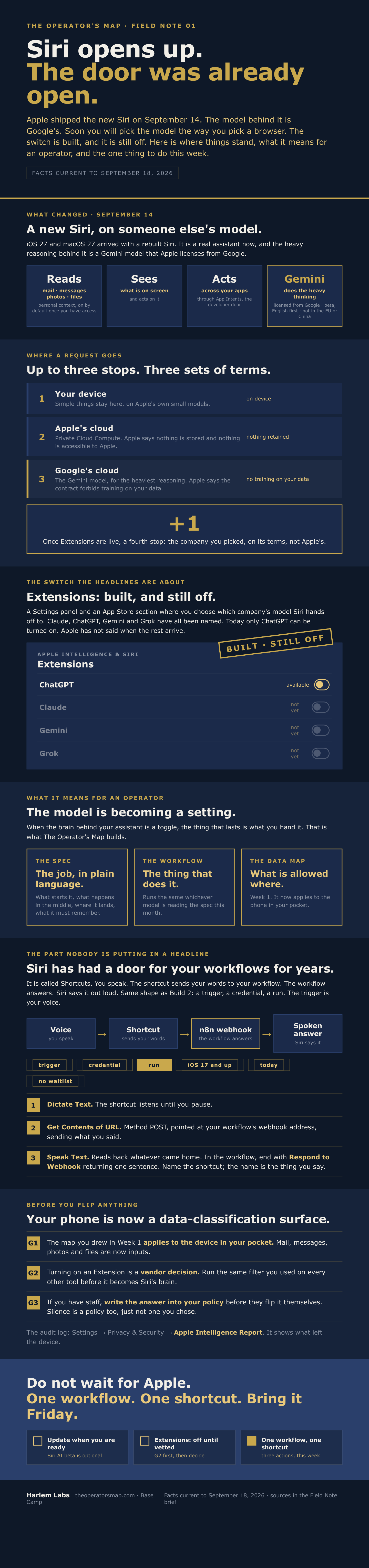
What she does know how to do, and has known for years, is run a shortcut. Apple’s Shortcuts app can take what you say, send it to any web address you give it, and read back whatever comes back. So that’s what happened. Siri took my sentence and handed it to GRIOT, the agent I’ve been building to run my business operations.
I opened the agent up in front of the room so they could watch the path.
The first thing GRIOT decides is whether I’m asking a question or just talking. Then it decides what kind of question it is: scheduling, a tool, something bigger. Mine was scheduling, so it went to the agent. The agent asked Claude one thing: which tool solves this? Claude picked the calendar agent. The calendar agent pulled my events from Google Calendar, wrote the answer, and passed it back up.
GRIOT sent it to Siri.
Siri then said it in her voice.
The way I described it to the room: it’s a brain with fingers. You decide to pick up a pen, your arm moves, and eventually your fingers have to grip it. GRIOT’s agent is the arm. The calendar agent, in the sub-workflow, is the fingers.
Most of that path isn’t AI at all. It’s plain logic. If this, go there. I didn’t spend a dime on that part. The model shows up twice in the process, to assess the question and to pick the tool.
This all matters because of what Apple shipped on September 14.
The new Siri runs on a custom Google Gemini model that Apple licenses. And built into iOS 27 is a setting called Extensions, where you’ll choose which AI Siri hands your request to: Claude, ChatGPT, Gemini, Grok. The code is in the release. A researcher has already made Claude answer through it on a Mac. But as I write this, the switch is off. ChatGPT is the only one you can turn on, and Apple hasn’t given a date for the rest.
So there’s a fight going on over who gets to be Siri’s brain, and it’s worth a lot of money to everyone in it.
Here’s what I need operators to notice. Every company in that fight wants you to believe the model is the decision. It’s what they sell, so of course they do.
But look at what Apple built. The model is becoming a setting. It is like a toggle in a menu, like picking your browser. And when the brain is a toggle, the brain isn’t what makes the answer yours. My Saturday answer didn’t come from any model being brilliant. It came from my calendar being connected, the credential being in place, and the path being written down.
That part belongs to each of us. No toggle changes it.
For years Google has paid Apple to be the default search engine on the iPhone. It came out in the antitrust trial that the payments ran to about twenty billion dollars in a single year. The default was the prize.
The businesses that did well in that era didn’t win by picking the right search engine. They won by owning something every search engine had to send people to.
The model slot is the new default. The companies will fight over it, and they should. You don’t have to be in that fight. You just have to own the thing every one of those models will have to call.
Right after the demo, an operator asked the question I was hoping for: does this work from the phone too, or only from my computer?
The honest answer is that the device isn’t the gate. The gate is authentication. Every connection in that path asks the same thing: who are you, and why are you asking for this? Siri can hand a sentence to anything. What comes back depends on what you’ve already connected, and who you’ve given permission to.
Another operator asked if it could chain. Check my Saturday, find a window between four and five, send someone an invite with the Zoom link.
Yes. That’s the same path with one more loop in it.
So here’s the decision you have to make, and it’s smaller than the headlines make it sound.
You can wait for Apple to flip the switch, and then choose a brain. Or you can build the door now. One workflow that knows something about your business. One shortcut that reaches it. Three actions, on iPhones going back to iOS 17. No waitlist.
When the switch does flip, the operator who already built the door gets to pick any model they want. The one who waited gets a smarter Siri who still doesn’t know anything about their Saturday.
The model is becoming a setting.
What you built is what the model gets handed.